Daddy’s Toolbox Tutorial and a Freebie!
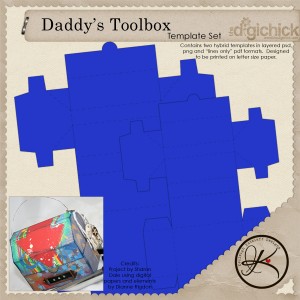 I am so excited about this new release! I created it as a last minute Father’s Day gift, and thought it would be an adorable container for a gift card, little notes or chocolates. And then, I got the idea of creating some mini tools to go inside! I imagined these tools all put together to make a mini album, or stacked up as little coupons for Dad.
Of course, I had to test it out, as I typically do, and figured that I would make a little present for the amazing father of my children. And, I took pictures of my process! Aren’t you so glad? Keep reading and pick up your own tool set freebie at the end of this post!
First of all, you need to go grab the Daddy’s Toolbox Template Set from my store, then unzip it and add papers to it. I created a tutorial for The Hybrid Chick that will guide you through this process if digital scrapbooking is new to you. If you would rather not open up Photoshop, I’ve also included a lines-only pdf version that you can print out on the back of a piece of patterned paper or cardstock.
After you have added paper and elements to the template, go ahead and print it out! You’ll want to use the Borderless Printing option on your printer, or size down your project just a bit (95% or so) so that the edges don’t get cut off. To help you find your borderless printing option, I’ve written this fun tutorial, again at The Hybrid Chick. Be sure to choose the right paper! (Another tutorial!) Whew!
Now that you know everything there is to know about hybrid (oh, wait! Look at this tutorial, too!), let’s get to work.
Here is my printed project. I used Elise Hansen’s What A Catch! digital kit for my project. You’ll notice that I printed the box on Epson Premium Presentation paper, and the tools are printed on my glossy photo paper (which comes free with my ink!). Also, notice that all those lines and words that come on the template have been recolored so they are not so noticeable! Pretty cool. Be sure to do that! Nothing worse than black lines mucking up your project.
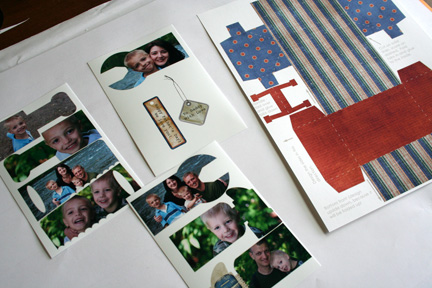
I almost always score my project before cutting it out. I found that if I turn my metal ruler over, it is closer to the paper, and I get a better scoring line.

Now, cut out your project. I’ve found that I use my craft knife (a glorified Exacto knife) about 90% of the time, now. Try it out! It is SO much faster and more precise than scissors.

Be sure to cut on ALL the solid lines. This includes the tiny little snips on the box top, as shown.

Now, assemble your box. Apply a little dry adhesive to the tabs that will be glued to the inside of the box. I use Tombow Mono Adhesive (and they really should send me some, as much as I talk them up, huh?). 

I included a little handle in your template, but feel free to make your own with wire or ribbon or anything your heart desires!

Next, cut out all the little tools. Again, I used my craft knife for this, and only broke out the micro-tip scissors for the saw. (Little rounded edges are tough!)

Next, I grabbed some “found chipboard” and glued the four tool fronts to it using a wet adhesive. (I used Beacon Zip Dry.) You can find chipboard all over the place. Cereal boxes are a great source, as are mailing envelopes. The piece that I used came from the back of a stack of cardstock.

Now, cut out the little tools, and then flip them over and glue the matching page to the back of them.

(Side note: Isn’t my family gorgeous? Good grief! And, that man makes me feel all fluttery inside! What a hotty!)
Ahem. Sorry about that.
Next, I figured out where I wanted my holes to “bind” the mini album by placing the saw shape on top and marking two spots.

I punched the holes using my Crop-o-dile. You really need one of these, so go ahead and splurge. They are so cool. If you don’t have one, though, just . . . figure out how to make a hole. Maybe use a drill or a piercing tool. You could use an eyelet setter and a hammer, too. (Please don’t use a big ‘ol fat hole punch. Ew.)
To “bind” the mini album, I just ran two pieces of hemp through the holes and tied it around a pencil so I could keep the lengths nice and even. This would be adorable with some ribbon, too!
(Another side note: I just love the little tag that came in Elise Hanson’s What a Catch digital kit! Check out the “eyelet”. That’s digital!)

The inside. (Sorry the pics aren’t so great! I was getting tired.)


(Yet another side note: I just LOVED the word art Elise included in her kit. And, those stitches are so awesome!!)

My finished project:
If you would like to create your own little toolbox for Daddy, grab my Daddy’s Toolbox Template Set from my store, and then come back here and pick up my Daddy’s Tools Blog Freebie.
Please leave me a comment if you grabbed the tools! I’d love to know!
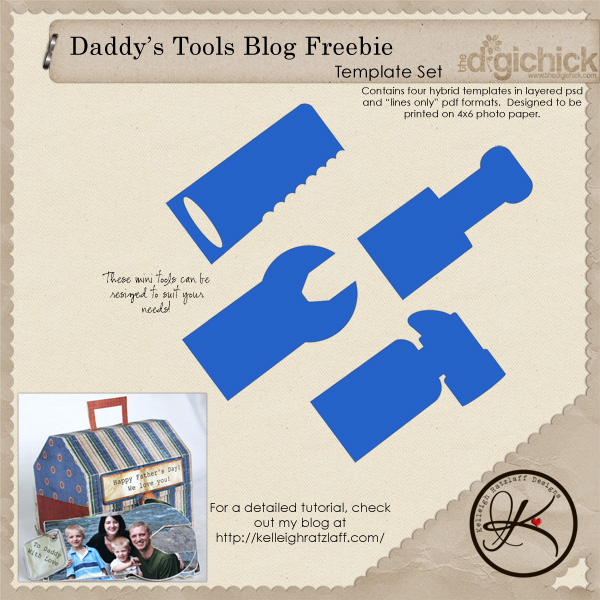
Have fun creating your own one-of-a-kind masterpiece!
Check out what my Creative Team did with this template!


 (1 votes, average: 5.00 out of 5)
 Loading ...
Another awesome project — thanks for the instructions — I need to go grab some “chipboard” out of our recycle box.
[Reply]
Kelleigh! Great tutorial! The pencil “spacer” for tying the binding twine was Excellent…Total ah hah moment for me. Can’t wait to grab the tools too:)
[Reply]
what an awesome template and thanks so much for the freebie AND for the tutorial!
[Reply]
Awesome tutorial, Kelleigh!!!!
[Reply]
OMG…This is FABULOUS! Awesome project!! Thanks SO much for sharing!!
You are the best. And you have a gorgeous family.
[Reply]
Wow - what a great idea! Thank you so much for your generousity and creativity!
I’ll definitely be downloading this idea and creating a fun album the way you have!
THANKS a bunch!!!!
[Reply]
These are fab and the tool album looks so cool. Yes! Your family are gorgeous! Thanks for the great tutorial too.
[Reply]
Thanks for the excellent tools freebie Kelleigh!
[Reply]
The toolbox template is awesome - thank you for “tools”. And thanks for the step by step tutorial too.
[Reply]
This is such a cute project, thanks! Fingers crossed that I can get it done before Sunday!
[Reply]
I so hope I get this one done before sunday too.
This template set is so amazing, such a great idea!
Thank you!
[Reply]
Thanks so much for the tutorial and freebie! Hopefull I can create something as cool as yours!
[Reply]
So cool…thanks for the freebie!
[Reply]
Brilliant designs Kelleigh what a great idea for Dad. Love how you’ve used the photos! :O)
[Reply]
What a great tutorial and thanks for the cute freebie! Adding your blog to my RSS reader.
[Reply]
The pirates chest is just darling and I love the template. Thanks so much for the tools.
[Reply]
[...] LOVED the little album I made him. It was a huge hit. He keeps talking about it! Yay! I scored. I also got him a little [...]
This is such a cute template Kelleigh! And you guys are just too cute!! Great pics and what a fantastic gift! LOVE it!
[Reply]
Thank you for the adorable freebie!!….My husband’s birthday is coming up in August, and I think this would be an awesome gift! The only thing is I am a hybrid chicken, plus I do not have a colour printer so I am not sure how this will turn out, but I intend to give it the ol’ college try!! lol
[Reply]
Kelleigh Reply:
July 24th, 2009 at 7:14 am
Don’t forget that you can always just print the lines onto cardstock and attach photos that you already have printed out! Then, just trim then in the shape of the tools!
Let me know when you have the project done, Patty! I’d love to see it!
[Reply]
Perfect!!!

I love.
[Reply]
This is awesome! Wish I’d know about that toolbox when I got your GC, guess it’s just another excuse to shop lol My DH loves his shed!
[Reply]
[...] I printed the Top Heavy Box Template on cardstock papers. The screwdriver and wrench templates are Daddy’s Tools Blog Freebie from Kelleigh [...]
So cute. I just grabbed your tools and purchased the toolbox. Now getting a trial version of photoshop elements and referring to your tutorial to see if I can make one of these toolboxes digitally. Wish me luck.
[Reply]
[...] night, even though I have NO idea what I am doing! I am currently working on one of her templates (Daddy’s Toolbox) for my husband for Valentines Day. Her templates are awesome and only 3.99 and includes PDF files [...]
[...] cute are those! Kelleigh offered those tools as a freebie at the end of her blog post, so check her out! But don’t compare her toolbox to mine, [...]
[...] go get yerself the Daddy’s Toolbox Template, and then make sure you check out the tutorial with a free set of tools to make a mini album to tuck inside. I just LOVE this little template and tool [...]
[...] grab Daddy’s Toolbox, then check out the tutorial I put together and download your FREE tools to tuck inside! You could write coupons on the tools or clip photos to them to make a mini [...]
These are so cute!!!!!!! Thanks for sharing!!!!
[Reply]
I just came across your website, very cool, thanks for the template!
[Reply]
Leave your response!
Want to keep up with my latest news and new releases? Subscribe to my newsletter today!
Check out My Latest Creations!:
Soap Box by Kelleigh Ratzlaff Designs: This adorable soap box can be filled with tiny soaps and pretty candies! $4.99
Hourglass Box by Kelleigh Ratzlaff Designs: This uniquely shaped box is the perfect size for gift cards and trinkets! $4.99
Cash Envelopes on Etsy!
Archives
Categories
Categories
Recent Comments
Most Commented
Most Viewed